June 25, 2026
June 25, 2026
Introducing Topic Selection. Passing your electrical licensing exam isn't just about putting in the hours — it's about putting them in the right places. If Motors & Controls keeps tripping you up, spending another hour on Branch Circuits isn't going to move the needle.
That's the problem Topic Selection is built to solve.
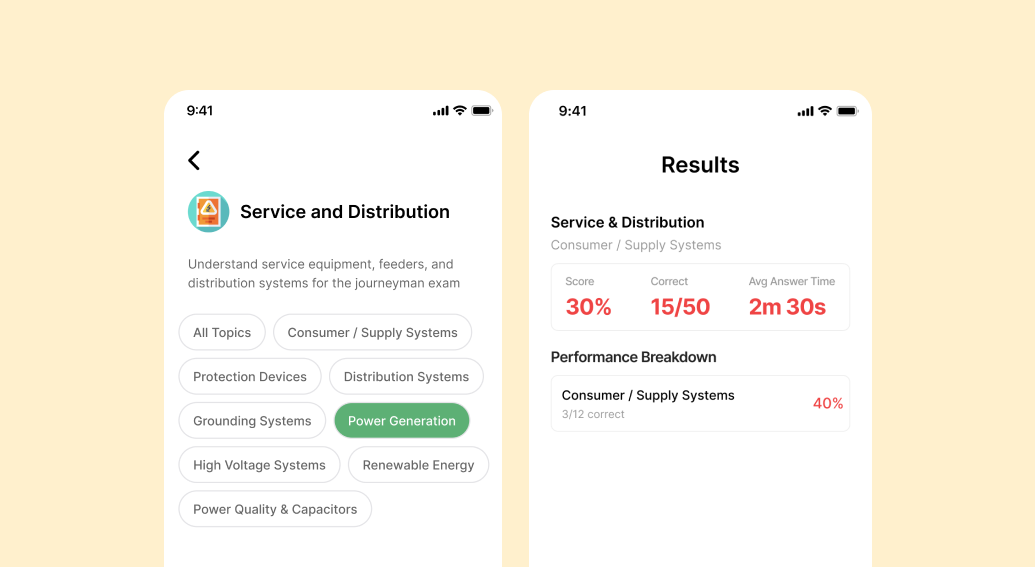
Dakota Prep has added topic-level filtering to Practice Mode in the NEC and CEC Electrical Exam Prep apps. When you select a practice category — say, Service & Distribution — you'll now see a set of topic chips at the top of the screen. Tap one to focus your session on just that topic. Leave it set to All Topics if you want the full category experience, same as before.
Topics are drawn directly from the exam content structure, so what you're drilling is what actually shows up on the test. For NEC users, that means topics like Raceways & Cables, Branch Circuits, Motors, Transformers, and more. CEC users get topics like Renewable Energy, Automated Control Systems, Circuit Concepts, and beyond.
Once you've selected your category and topic, choose your session length — Regular (25 questions) or Short (5 questions) — and start practicing. When you finish, your results screen shows a performance breakdown by topic, so you can see exactly how you did on that specific area. Your past exam history also records the topic you practiced, making it easy to track your progress over time.
Most exam candidates have a rough sense of where they're weak. What they haven't had before is a fast, focused way to act on that. Topic Selection turns a general feeling — "I'm not great at Grounding Systems" — into a structured study session you can do in 10 minutes on your lunch break.
This feature is available now in the NEC Electrical Exam Prep and CEC Electrical Exam Prep apps on mobile & web.
Download now to access thousands of practice questions across electrical & plumbing for US and Canada